How to Organise a Solved-Notes Folder by Subject and Chapter

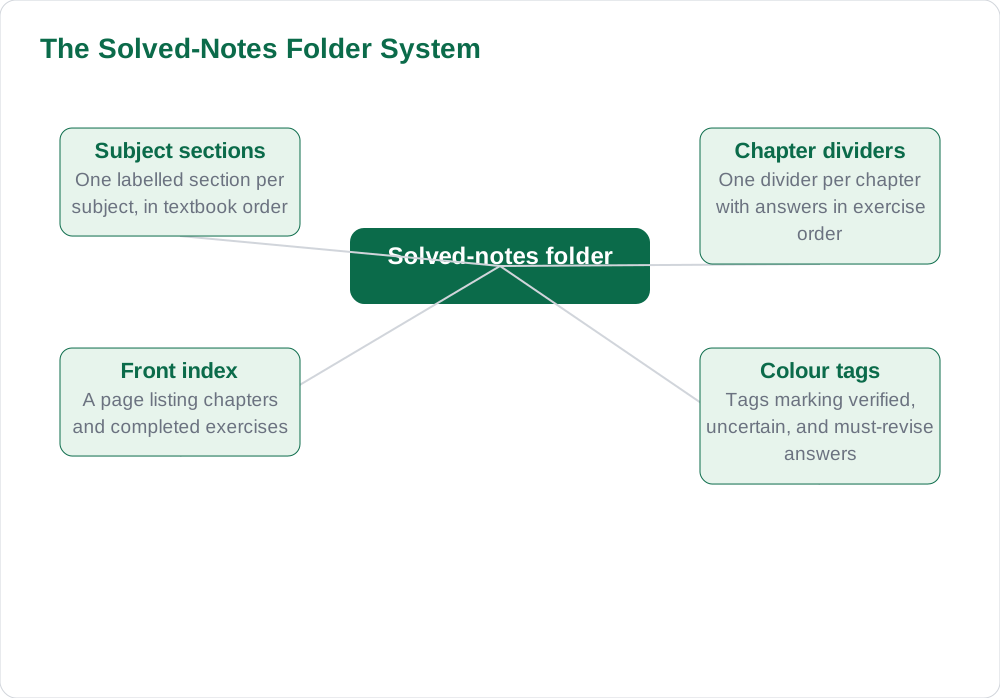
Solved notes only help revision if they can be found. Pupils who keep answers in loose piles, mixed notebooks, or unlabelled files waste revision time searching, and often give up and re-read the textbook instead. A simple folder system fixes this: one section per subject, one divider per chapter, an index at the front, and colour tags for status. With that system, any answer can be found in under a minute, and revision becomes a matter of opening the right chapter, not hunting through a pile.
One Section Per Subject
The folder's top level is the subject. Each subject gets its own section, clearly labelled on a divider or in a separate folder for digital notes. Mixing subjects in one section is the fastest way to lose notes, because a pupil searching for a science answer must sift through language answers to find it. Separate sections also make workload visible: a thin section shows a subject being neglected, while a thick one shows steady work, which helps pupils balance their time before exams.
Within each subject, the order should match the textbook's chapter order, not the order in which exercises were done. Textbook order is the order exams follow, so a folder in textbook order revises in exam order. Pupils should file new answers immediately after they are written and verified, rather than letting them pile up for a weekly sort, because a pile is where notes get lost. Immediate filing takes seconds and is the habit on which the whole system depends.
One Divider Per Chapter, Plus an Index
Inside each subject section, chapters get their own dividers, labelled with the chapter number and title exactly as the textbook gives them. All answers for a chapter's exercises go behind that chapter's divider, in exercise order. This means a pupil revising one chapter opens one place and finds everything: short answers, long answers, and diagrams together. No chapter's material should live anywhere else, or the system breaks down at the moment it is needed most.
At the front of each subject section sits an index: a single page listing every chapter, the exercises completed for it, and the page or position of each answer. The index is updated whenever new answers are filed, which takes less than a minute. During revision, the index answers the question of what exists before the pupil starts searching, and it reveals gaps: a chapter with no entries is a chapter not yet studied. An index turns a folder from a storage box into a study tool.
Colour Tags for Status
Colour tags add a second layer of organisation: status. A simple three-colour system works well. One colour, for example green, marks answers that are verified against the textbook and ready for revision. A second colour, such as yellow, marks answers that are uncertain or awaiting a teacher's answer. A third colour, such as red, marks answers that must be revised because they were missed in a test or are frequently forgotten. Tags can be small stickers, coloured tabs, or highlighted marks in a digital folder; the form matters less than consistency.
Status tags make revision sessions efficient. A pupil with twenty minutes can revise only the red-tagged answers, or only the yellow ones needing resolution, instead of re-reading everything. As answers improve, their tags change: a red answer learned well becomes green, and a yellow answer resolved becomes green too. Watching the folder turn green over a term is motivating, because it makes progress visible in a way that marks alone do not.
Verified Answers Only in the Main Folder
A folder rule worth enforcing is that only verified answers live in the main sections. Unverified or rough answers stay in a separate rough section at the back until they pass the textbook check described in How to Check Your Answers Against the Textbook. This rule protects revision: a pupil opening the main folder can trust everything in it, without wondering which answers are reliable. Trust is the whole value of a solved-notes folder, and mixing unverified material into it destroys that value silently.
The rough section is not a bin; it is a waiting room. Answers there are checked, corrected, and promoted into the main folder as soon as they pass verification. Pupils should review the rough section weekly so nothing waits there for long. This two-zone system, main folder for trusted answers and rough section for pending ones, keeps the folder both complete and reliable, which is exactly what exam revision needs.
- Main folder: only answers verified against the textbook.
- Rough section: drafts and unverified answers, kept separate.
- Weekly review: promote verified answers, resolve uncertain ones.
- Never revise from the rough section; revise from verified answers only.
Maintaining the System All Year
A folder system only works if it is maintained, and maintenance is mostly small weekly habits. File new answers the day they are written, update the index at the same time, change tags as answers improve, and clear the rough section once a week. A ten-minute weekly tidy keeps the folder usable all year, while a neglected folder collapses within a month and must be rebuilt under exam pressure, which is the worst time to rebuild anything.
At the end of each term, the pupil should review the whole folder once: check that every chapter has its divider and index entries, remove duplicate or superseded answers, and confirm that tags reflect current knowledge. This termly review turns the folder into a complete record of the year's learning, ready for final exams. A well-kept folder is one of the most valuable things a pupil can own, because it contains a year's verified work in findable form. Start today with the drafting workflow in A Drafting Workflow for Solved Notes: From Rough Answer to Fair Copy, and find your textbooks through the books listing and the [home page](/) for your class.
AI Help: Muse AI
Muse AI is Meta's personal AI assistant, and it can help with organising notes in a practical way. A pupil can ask Muse to suggest an index layout for a subject, or to help plan a weekly tidy routine, which makes keeping the folder system easy.
Join Muse with invite code LTGSWD — in the Muse app, go to Settings > Redeem token and enter the code.
Disclosure: LTGSWD is the author's Muse invite code.
Muse AI does not give official STBB answers — always verify against your Sindh Textbook Board book and your teacher.
5 key points you must know
- One labelled section per subject, ordered as the textbook orders chapters.
- One divider per chapter, with answers filed in exercise order.
- Keep a front index listing chapters and completed exercises.
- Use colour tags for verified, uncertain, and must-revise answers.
- Only verified answers live in the main folder; drafts stay in a rough section.
Frequently asked questions
Should I use a physical folder or a digital one?
Either works if the structure is the same: subject sections, chapter dividers, an index, and status tags. Physical folders suit pupils who write by hand, while digital folders suit pupils who type notes. Choose the one you will maintain weekly.
What if I have answers for a chapter from different sources?
File your own verified answer in the main section, and keep other sources' answers behind it as reference, clearly marked. Your own verified answer is the one to revise from; the others are for comparison only.
How often should I update the index?
Every time you file new answers, which takes under a minute. An out-of-date index is worse than no index, because it sends you searching in the wrong place. Make index updates part of filing, not a separate task.
What should I do with last year's folder?
Keep it, clearly labelled by class year, in case earlier material is needed for revision or reference. Start a fresh folder for the new class year so current work stays separate and findable.
Solved notes — preview free
These guides work best with the solved exercises. Preview the solved notes free on this website — 119 solved notes for Classes 6–10 in Sindhi, Urdu, English and Arabic medium. Or browse the full solved notes catalogue for your class and medium. New solved notes are added regularly — check the catalogue for coming-soon books.